TravelJapanBlog.com - Japan (07, 09-10, 13), Denmark (08, 11, 16-19, 21, 24), Korea (13), Poland (21), Mexico (14, 15, 19, 26), Iceland (17, 19), Hawaii (14, 17, 22), Czech Republic (16, 17, 19, 21)
The above will search Traveljapanblog.com.
Concerts - Landscapes - Sports


Archive for Japan

Final thoughts on My Japanese Coach

These will be my final thoughts, for a while anyway, on My Japanese Coach, the new game for the Nintendo DS.

The lessons (pictured to the left) in My Japanese Coach sort of jump all over the place and aren’t nearly as methodical as lessons you’ll find in a Japanese textbook like Genki. If another company chooses to create a game that teaches Japanese on the DS, a more structured approach should be considered. Perhaps the first 40 lessons should focus on what is needed to pass the JLPT 4 exam. The next 40 could focus on JLPT 3 and so on. In this way a person could theoretically be prepared to sit for JLPT 1 by going through the whole game of 1,000 lessons. If nothing else, it will keep the programmer focused on keeping things simple early on (which isn’t always the case with My Japanese Coach).

The lessons in Japanese are a mixed bag. Some are OK. Others are poorly written, unclear, lack examples to illustrate a concept, or flat out wrong in places. I almost wish I could have been commissioned to write the lessons. 😉 Japanese need not be as confusing as the lessons can make things appear.

Many words are brought forward in non-dictionary form without explanation. This will prove very confusing to new learners of Japanese. For instance “drunk” is presented as yopparatta instead of yopparau for “to get drunk.” “Rude” is said to be shitsureina instead of shitsurei. It is true that a na particle will frequently show up after shitsurei, but that isn’t always the case.

Sometimes kanji are presented before they are learned in the program. Grammar is sometimes taught incorrectly. For instance, hoshii can only be used for oneself. I think My Japanese Coach may hint at that fact, but then in the examples it is used incorrectly. Other people are also sometimes used in examples without a suffix like san or kun, and that isn’t correct either.

The grade levels are very misleading. For instance, in Lesson 48 of My Japanese Coach you enter the 4th Grade, yet you only have learned only 20 kanji. Japanese kids entering 4th Grade actually know over 400 kanji. Even though 20 characters have been introduced, kun and on readings have yet to be distinguished.

In summary, I hope the strong demand for this product will light a fire under DS game developers to create a game like My Japanese Coach without all of the flaws. The task shouldn’t be too difficult to accomplish. Some of the existing games for Japanese people (like Tadashii Kanji Kakitorikun Kanken Taisaku or Nazotte Oboeru Otona no Kanji Renshuu Kanzenhan) can be adapted with English translations. The only other thing that would need to be added is the lessons.

Another approach could be to just upgrade the Ubisoft product by having a native Japanese person work on the calligraphy, employ someone who teaches Japanese to re-write the lessons, improve the character recognition software, and replace some of the useless games with games that will improve a person’s Japanese language abilities (including kanji games like those in Tadashii… and Nazotte…). Add a kanji lookup dictionary like Kanji Sonomama Rakubiki Jiten and you will be talking about a fantastic product that Ubisoft can sell for over $50 instead of $30. I’d much rather pay $100 for such a product than $30 for My Japanese Coach. How long do you think I will have to wait for such a thing to come to fruition?

In the meantime, I’ll continue to go through the vocabulary in My Japanese Coach. My Japanese Coach is a worthy investment for a beginner (if it doesn’t build too many bad habits like incorrect stroke order and sloppy grammar) at only $30. Intermediate and Advance students of the Japanese language will want to stick with Japanese titles produced by Japanese companies to improve their Japanese at this point.
More minigames in My Japanese Coach

I’m now on Lesson 45 which means I have unlocked the last of the minigames. There are 12 in all. Yesterday I covered the first five. Today I will cover the last seven.

Flash Cards is the most useful of the minigames. It’s also your fastest way through the levels if you play it on Hard as you can earn 50 points in under 20 seconds. You’ll need headphones or a quiet place to play it though. For the first 43 levels you hear a word and then have up to two seconds to select the correct choice in English. Once you hit Lesson 44 you’ll get a mix of audio and visual kanji. For the kanji you see the kanji (and hear nothing) and have two seconds to select the meaning. There are two problems with this game: the kanji are tiny and the card choices aren’t random so you know not to pick the wrong cards that have already been used.

Memory is a decent game but not really great for learning. It is your typical memory game of flipping over cards and matching the two that are the same. The twist is that they are the same in two different languages. You do get kana (after Lesson 30) and kanji (after Lesson 44) instead of romaji which is nice. This game is a slow way to learn the language though.

Bridge Builder (pictured in my entry two days back) is the only part of My Japanese Coach which has you put together sentences. That’s too bad since stringing words together is what speaking a language is all about. This game is too easy though as all the correct words are given. It’s also all in romaji even after Levels 30 and 44. This game could be improved with kanji/kana, instead, and with some incorrect words provided so that you really had to put together the correct words (and not just plop down all of the given words and particles). Also, there are only a few of these, if that, per lesson. There should be many more dealing with each lesson. Sometimes items are in here that haven’t been covered yet in a lesson.

Spelltastic adds nothing that can’t already be gained from Flash Cards. A word is spoken in Japanese, and then the user has to type out the word in romaji on a qwerty keyboard. Ugh. A waste of time really. If you want to practice your listening skills you are much better off with the Flash Cards minigame.

Fill-in-the-Blank is basically Spelltastic with a come-up-with-the-word, instead of listening, requirement. Again, you have to type out a Japanese word in romaji on a qwerty keyboard which makes no sense for Japanese learning.

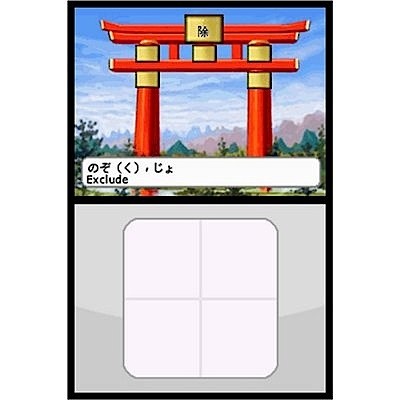
Yomi is the game pictured above. When I first started playing it, without having read the rules, I couldn’t figure out what it wanted. I tried writing kanji and then alternative readings of the given kanji. Neither worked. It turns out the game was much more basic (and useless) than what I envisioned. You merely need to copy the kanji or kana given. Once again, the recognition is not great, and you will be marked wrong frequently when writing in the correct stroke order. The instructions don’t match what you actually do in the game.

Scrolls relies on My Japanese Coach‘s less than reliable kana and kanji recognition software. You are given a word in romaji and asked to write it in kana. Sometimes it gives you the kana and asks for the kanji. It has yet to recognize a properly written mizu kanji for me.

In summary, all of the minigames could be improved. Only three or four of the twelve are decent for really learning. It’s a shame that Ubisoft merely took My Spanish Coach‘s minigames and thought they would work just as good for a language like Japanese which isn’t written with Roman letters. They should have borrowed/adapted some of the very good games out there for Japanese kids and adults learning Japanese on the DS and added English translations in the game for English speakers learning Japanese on the DS.

Minigames in My Japanese Coach

I’m up to Lesson 42 which means I now have 10 minigames within My Japanese Coach to choose from. Here is my assessment of the first five:

Multiple Choice is pictured to the left and is one of the most useful of the minigames for learning Japanese. It is also the one you will want to use if you want to quickly move up levels because you already know some Japanese. You can get through a level/lesson in about 2 minutes by playing Multiple Choice on Hard setting. After Lesson 30 you can do Multiple Choice in kana mode (as pictured) which is nice practice for those still learning to read kana. Before Lesson 30 you can only do it in romaji mode. When you click on the correct choice in this game, My Japanese Coach also says the word in Japanese which is good for listening practice.

Hit-a-Word is a Wack-a-Mole type game that is completely useless for learning Japanese. This game features no Japanese audio and measures only how quickly you can hit the screen.

Word Search is also completely worthless. You have to find hidden Japanese words written in romaji (even after Lesson 30) and draw a line through them. You will learn no Japanese in doing so, but you will waste a lot of time.

Fading Characters would be useful for learning how to write hiragana and katakana were it not for the fact that many characters are written with an improper stroke order, the examples written like a gaijin instead of like a native Japanese person, and if the character recognition software was as good as it is in other games like Nazotte Oboeru Otona no Kanji Renshuu Kanzenhan. My Japanese Coach‘s character recognition is not nearly as good.

Write Cards is a little better than Fading Characters in that you don’t have to see the characters clumsily written by a gaijin before writing the word provided. You also get to hear correct, native Japanese pronunciation when you finish writing each word. Once you learn hiragana and katakana, though, Write Cards is of no further use to improving your Japanese.

More My Japanese Coach “bugs”

I tried taking some pictures of screens to show you some screenshots that aren’t from Ubisoft, but they all came out blurry. Sorry. I’m now on Lesson 31, and the bugs or other problems with My Japanese Coach continue to surface.

There are occasional typos or unclear portions of the lessons. For instance, when discussing Japanese particles the coach says (or rather writes), “The first one I want to cover is と(to), as in ‘go to the store.’ The particle for that in Japanese is に(ni).”

A first time learner will likely be confused between the particles と and に with this explanation. What the coach should have said, had someone proofread the game before finalizing it, is, “The first one I want to cover deals with ‘to,’ as in ‘go to the store.’ The particle for the word to (as in direction) in Japanese is に(ni).”

Another problem is the one-word definitions with no examples. For instance, imi suru was one of my vocabulary words in a recent lesson. The definition given? Mean. That’s it. Mean. In English the word mean has more than a half dozen meanings. Does imi suru mean average, method, unkind, indicate, consequence, excellent, or one of mean’s other meanings? There is no way to tell with just My Japanese Coach. Should they ever do another version, they need to fix this. They should, at least, include an example sentence. They could also include an example sentence using the new vocabulary word in the correct context in the Bridge Builder game (pictured here).

The verb bases discussion is going to go over any beginner’s head the way it is introduced and taught. While the charts with the five bases plus te and ta bases may be correct, a beginner has no idea why they are being taught them or of what use they are.

The map of Japan the user travels through is rather strange. When you hit Lesson 30 you go south from Tokyo to end up in Hokkaido. If you want to go back to Tokyo you go up (north) from Hokkaido to get to Tokyo. That seems a bit different than the Japan I once lived in. 

One last shortcoming I’d like to point out for today is the ordering of the vocabulary introduced. I have read elsewhere that once you hit Lesson 100 you get 10 new, random vocabulary words for each lesson. The arbitrariness of the new vocabulary words taught doesn’t seem to wait until Lesson 100 though. In Lesson 26 there are words like kagayaku, hakaisuru, and unazuku. These words are pretty advanced for Lesson 26, considering most JLPT Level 4 words (the most basic and most used 700+ words in Japanese) have yet to be covered.

My Japanese Coach is selling well

My Japanese Coach for the Nintendo DS is selling really well on amazon.com. It is ranked #1 in its category ahead of titles like Spore Creature, Cooking Mama, and Nintendogs. It’s in the top 10 for all DS games. I hope this shows other game developers that there is demand out there for a product that teaches Japanese to those who speak English. After playing the game for a few hours now, I’m hoping a Japanese company produces a similar title without all of the mistakes.

And what are the problems? As mentioned previously, intermediate students of the language are going to have to play the game for hours, maybe even days or weeks, before they learn something new. There is a way to skip to Lesson 30, but the developer has yet to reveal that cheat code. Hiragana yo and na, as well as katakana ka, ne, no, hi, and wa, show an incorrect stroke order. The characters are sometimes drawn poorly. Katakana i, for instance, shows the middle line way over to the right when it should be right down the center of the screen. The character recognition is not nearly as good as in some other kanji learning games like Nazotte….

Something else that would be nice to have in this game is a kanji lookup dictionary like that found in Nazotte Oboeru Otona no Kanji Renshuu Kanzenhan or Kanji Sonomama Rakubiki Jiten.

Based on the popularity of this title I hope Ubisoft will employ a native Japanese person to improve a second version of My Japanese Coach. If they don’t, maybe some other company will take up the charge to create a bug-free Japanese learning game that will be of use to both beginners and more experienced Japanese learners. I’ll keep my fingers crossed.

Until then, My Japanese Coach is still good for beginners who don’t mind learning a few things incorrectly but is frustrating to those past the beginner level who will get more out of Nazotte… and other titles aimed at Japanese people.

My Japanese Coach dictionary and other features

Within an hour of receiving My Japanese Coach for the Nintendo DS in the mail, my 12-year old son came home. Needless to say, that was the end of my experiments with the game until today when he went to school, allowing me to finally get a crack at it again. Apparently he found My Japanese Coach quite addictive and learned a few dozen words last night and this morning before school.

I went into the audio section of the program (pictured to the left) and played around a bit. Although the game doesn’t correct your pronunciation, it does offer you a native female speaker saying a word. You can then record your pronunciation of the same word and play them both back simultaneously. This is actually more helpful than it sounds, and the quality of the recording is quite good.

While the speaker is native, I have a feeling that much of the character (both kanji and kana) drawing in the program is not done by a native Japanese person. This is unfortunate. As I mentioned in yesterday’s blog entry, some of the stroke order is wrong. If you, as the learner, write it correctly you will be marked wrong. You have to write the character wrong to get it right. Ugh.

If you go under Options/Credits you can see all the names of the people who created the game. They are nearly all non-Japanese names except for the voice actor. All of the beta testers have non-Japanese names. Again, this is unfortunate. Ubisoft should have hired some more native Japanese speakers and character writers to create and test this product so that it is 100% accurate and bug free. People purchasing this game want to learn how to write like the Japanese, not like gaijin.

Finally, for today, I played around with the dictionary. There is both an ei-wa (English-Japanese) and wa-ei (Japanese-English) dictionary. The wa-ei comes in both romaji and kana versions. While the dictionary is quick and handy, it isn’t huge at about 10,000 words (compared to a good electronic dictionary with more than 20 times as many words). Also, it includes only a one or two word definition without any example sentences so its usefulness is limited.