TravelJapanBlog.com - Japan (07, 09-10, 13), Denmark (08, 11, 16-19, 21, 24), Korea (13), Poland (21), Mexico (14, 15, 19, 26), Iceland (17, 19), Hawaii (14, 17, 22), Czech Republic (16, 17, 19, 21)
The above will search Traveljapanblog.com.
Concerts - Landscapes - Sports


Posts tagged reviews

Canon Pixma MG5220 Wireless Inkjet Photo All-In-One Printer/Copier/Scanner
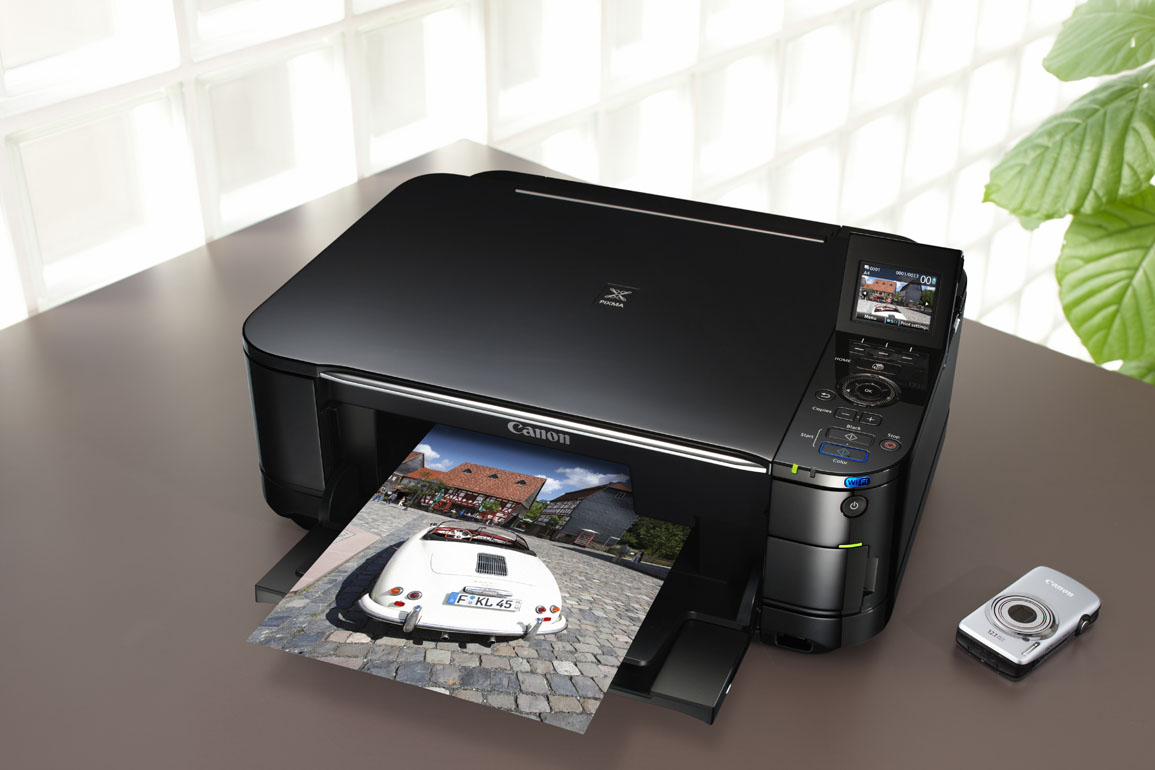
My new printer arrived yesterday. I needed a wireless printer so that everyone in the family wouldn’t need to send things to me to be printed anymore. In addition, the MG5220 from Canon does a far superior job on quality compared to my old Canon all-in-one. 9600 dpi on the prints and 4800 dpi on the scans–wow, that’s double my old all-in-one. For under $100, this printer delivers really amazing results.

While this printer is slightly bigger than my old one (and much heavier), it doesn’t have paper sticking out of it like most ink jets. Instead, there is a paper tray which is completely hidden on the bottom. In addition, when you print something, you don’t need to open an exit for the paper to come out. The printer automatically opens a little door that the printed items comes out of. Very cool.

When I was looking at this Canon PIXMA MG5220 Wireless Inkjet All-In-One Printer on Amazon I was a bit worried by the reviews that complained about installation. This isn’t exactly plug and play where you just plug it in and it works. I followed the directions with no problems until I got to the wireless hook up part. Not only were the instructions confusing, but they didn’t work for me even when I followed them to the letter. I almost gave up. However, I then pulled out the CD that came with the package. I popped the CD in my desktop computer (running Windows 7), and it not only installed everything I needed on my hard drive but it also automatically detected the printer, wirelessly, and connected with it without a problem. I then put the CD in all the laptops around my house (one running XP, one running Vista, and one being a MacBook) and they all connected to the MG5220 effortlessly as well. If you are experiencing similar difficulties, skip the directions and go straight for the CD and your results may be successful as well.

Hotwire review

Here is the skinny on hotwire.com. Avoid hotwire. Beware of hotwire. Hotwire sucks.

For the longer version, read on.

Next month I’m taking a little trip to Seattle with four unrelated people. My job was to book the hotel. Somehow I ended up on hotwire.com. They had an unnamed hotel in the location I needed for a good price*. Before booking I read all the rules, restrictions, terms of use, etc. on their site. One said, “room type will be determined by the hotel based on the number of guests provided at time of booking.” This worried me a bit as there are no couples in my group of five. Therefore, I needed at least five beds. So I called hotwire before booking and asked them if booking three rooms for five people meant three beds or five (or six) beds. I was assured that I would get at least as many beds as people. I was told to call the hotel after booking to confirm this.

So I booked the non-refundable rooms and called the hotel. The hotel told me that I was booked for three rooms with only one, double bed in each room. I explained my situation and asked if they had rooms available with two beds in each room. “Yes,” they replied, “we have plenty of those rooms open on the night you are staying here, but hotwire won’t let us give you those rooms.” “You will have to call hotwire and have them change you to the rooms with two beds.” I explained that hotwire told me to call them. “Sorry,” the hotel says, “hotwire will have to make the change. We can’t on our end.”

I contacted hotwire again. This time they said if I want two beds in two of the rooms I have to pay extra. We went back and forth in a dozen email messages and they wouldn’t budge. Each time a different representative regurgitated the same lines over and over again. “You should have read our terms of use.” I did. And I called you before booking just to be sure. “No refunds.” I know. That is why I called you first to make sure I wouldn’t need a refund.

Anyway, moral of the story. Don’t book with hotwire. Not only will you be stuck with something you may not have bargained for, they don’t follow through on any assertions or promises they make prior to booking. Once they have you in the non-refundable category, they have no incentive to please the customer or make you happy.

*To top it off, the hotel they booked me with has lower rates on their website than the rate I paid with hotwire. Lesson learned.

The down side of buying a Panasonic

lumix tz10

I had been generally happy with my last three Panasonic cameras. Those days are over. First my TZ10’s zoom knob broke. Maybe broke isn’t the right word. The control became somewhat “sticky” and difficult to move sometimes. Sometimes it worked fine. Other times it was really annoying and caused me to miss shots. But I could live with it.

Last week my photos began to exhibit a smudge of sorts near the center. I cleaned the lens, still no good. Nothing I could do would remove the gray circle a bit off center in my photos; nor could I see anything on the lens to suggest why this was happening. One problem I could live with. Two, and especially when one affects picture quality, I could not. No problem I thought. I have only owned this camera for four months, and the TZ10 came with a one-year, worldwide warranty on both parts and labor.

I contacted Panasonic USA to see what I should do. Initially they said they couldn’t help since I purchased the camera outside of the USA. They said I could get it serviced in Japan, or, for a fee, they may make an exception for me. Hmmmm…. why a fee for a warrantied product? Several emails and two phone calls later I gave up on getting any help from Panasonic USA.

Next I tried to get help from Panasonic Japan, since I purchased the camera while living in Japan and the Japanese are generally better when it comes to service issues. They seemed very helpful if I lived in Japan, but they can do nothing for customers who purchased a product in Japan and then moved out of Japan. So I went back to Panasonic USA and pled my case. They told me that, “The world wide warranty does not include the US. We are sorry for your inconvenience they will not owner the warranty in the US.” So, apparently the USA is no longer part of the world.

They kept telling me that they don’t sell the TZ10 so they can’t service it. Never mind the fact that it is the exact same camera as the ZS7 which they do service.

Their ad for the camera is true. The camera is “for world travelers” because when it breaks you have to travel the world in order to get them to honor their warranty.

Corel PaintShop Photo Pro X3’s noise removal process

marble buddha in kyoto japan gion

I recently purchased an HP Laptop (Pavilion HDX18T 18.4-Inch Screen) which came with Corel PaintShop Photo Pro X3 preinstalled. I haven’t used (what was then known as) Paint Shop Pro since it was shareware back in the early to mid-1990s. It seems to be more of a resource hog than the more popular Photoshop, but one thing I really like about it is the noise removal.

Today’s top photo I took several years ago in Kyoto and posted early last year here.

The version below has had PaintShop Photo Pro’s “Noise Removal” applied to it. You may not notice much viewing them at only 800 pixels wide, but if you have a decent screen and can view them in something more like 1700×1050 then click on the images and compare. The noise removal really cleans things up in higher resolution.

kyoto buddhist japan

Japanese cell phone plan results

Before going to Japan I mentioned my research on the various Japanese cell phone plans. Now that we have actually experienced a year with Japanese cell phones I’ll give you a review.

Getting the phones was more complicated than I imagined. We couldn’t get them as soon as we got to Japan because the providers require a gaijin card which may take a few days to obtain–especially if you arrive in Japan on a Friday or Saturday. A passport is not good enough. Once we had the gaijin cards (gaikokujin-tourokushou or 外国人登録証) we visited several different Softbank stores. They all quoted us different offers. We ended up going with the Harajuku store for two phones for a year on the White Plan Family. We were expecting about 800 yen a month per phone, the seemingly low price due to the fact that we only planned to use them to call each other. The first few bills came in at more than double these amounts so we went in, they made some adjustments, and the bills dropped to about 2,000 yen a month–not the 1,600 yen we were hoping for but with taxes and whatever we didn’t push it.

We had to pay with a credit card which meant the bills were even higher as the currency translation for our US credit cards always stuck us with a few more bucks. Most monthly bills ended up being about $28 after all of the fees.

When we went to cancel we had to pay 20,000 yen (again, credit card only–no cash) so we got stuck with a final bill of over $250 with the strong yen. Ouch!

If I had it to do over again I would have purchased cheap phones and a prepaid option. With the amount we called I probably could have saved a few hundred bucks during the year.

Nikko – Funamiso Hotel (舟見荘)

For our one night in Nikko we decided upon the Funamiso, about 20 minutes away from downtown Nikko on the train (Kosagoe Station 小佐越駅 covered with our Nikko Pass). We were debating between a place right in Nikko (without an onsen but convenient) or a place far from the city (which would have taken more than an hour to get to from Nikko but with a great-looking onsen). The Funamiso seemed like a happy medium. I’m not sure if this place is technically a hotel, ryokan, minshuku, or pension. I suppose it could fit into any of those categories.

Not being a huge fan of seafood, I opted for the no meal plan at Funamiso. I’m sure I would have enjoyed the shabu-shabu dinner, but 7,000 yen each is more than I want to spend on a single dinner no matter how delicious. Waking up to a Japanese breakfast of fish, rice, and vegetables isn’t my cup of tea either. The no meal plan is affordable at 5,000 yen per person.

Funamiso was a bit disappointing from the outside, but once we made it inside everything was great. The place was very clean, the staff was nice, the views were good, and the outdoor part of the onsen was spectacular. Our room was Japanese style so we slept in futon on tatami floors. We had a private bath in the room that looked like it had never been used. We didn’t use it either. Who would when there is a wonderful onsen downstairs? My only complaint is the privacy fence around the outside onsen. It provided very little privacy (not that I cared) and obstructed the view. Lose the fence and this onsen is close to perfection.

The above picture is from the room on the evening we arrived. The steam from the onsen below beckons. Snow had just fallen. A couple of spotlights allowed onsen users to view the snow-covered trees and a little waterfall into the river even after dark. Speaking of users, I was the only user of the male onsen. Funamiso has several dozen rooms, but only three were being used on this weeknight in February. I had the onsen, all three pools, completely to myself each time. I have had fun talking to random Japanese strangers in onsen, but I didn’t get the chance with this onsen basically being private due to a lack of guests.

We arrived at Funamiso at about dusk. The view from our room was more stunning the next morning as the sun rose.

The moon was setting as the sun was rising.

After checking out we went for a walk that took us over two different bridges spanning the Kinu River (鬼怒川).

Would I recommend Ryokan Funamiso? Absolutely.