| The above will search Ashland Daily Photo. |
This past weekend I was hiking on Upper Table Rock. The ground was covered with wildflowers and snow-covered Mt. McLoughlin looked splendid in the distance. So I took this photo of the wildflowers.
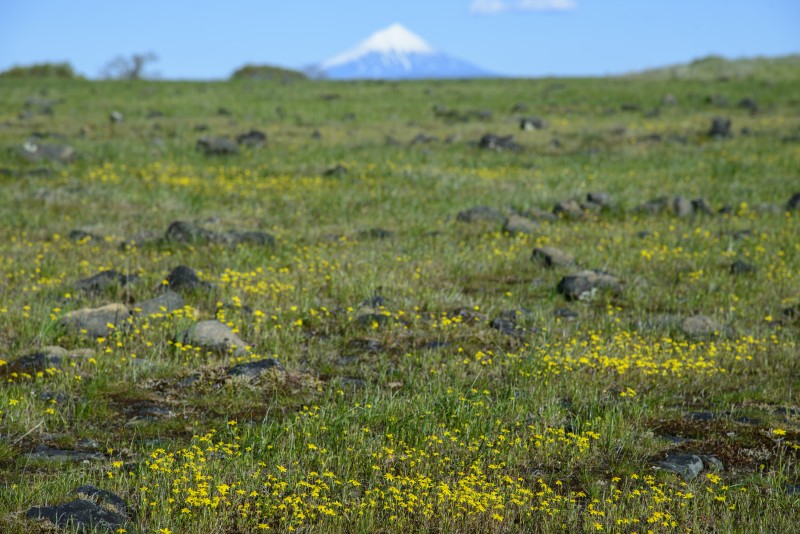
But I wanted a photo with Mount McLoughlin in focus so I took another one.
When I got home I was a bit disappointed in each photo.
My photography and Photoshop skills are completely self taught. I have never taken a class, had a tutor/mentor, or even read a book on either subject. I’ve learned merely by trial and error with my camera and trying different things in Photoshop.
So what I wanted to do was combine the above two photos. I did so by using Photomerge (under File/Automate) in Photoshop and unchecking the “Blend Images Together” option. Hit F7 to see the layers if your layers box isn’t already open. Select both images, and use Auto-Blend Layers (under Edit) to stack the images. The result is below.
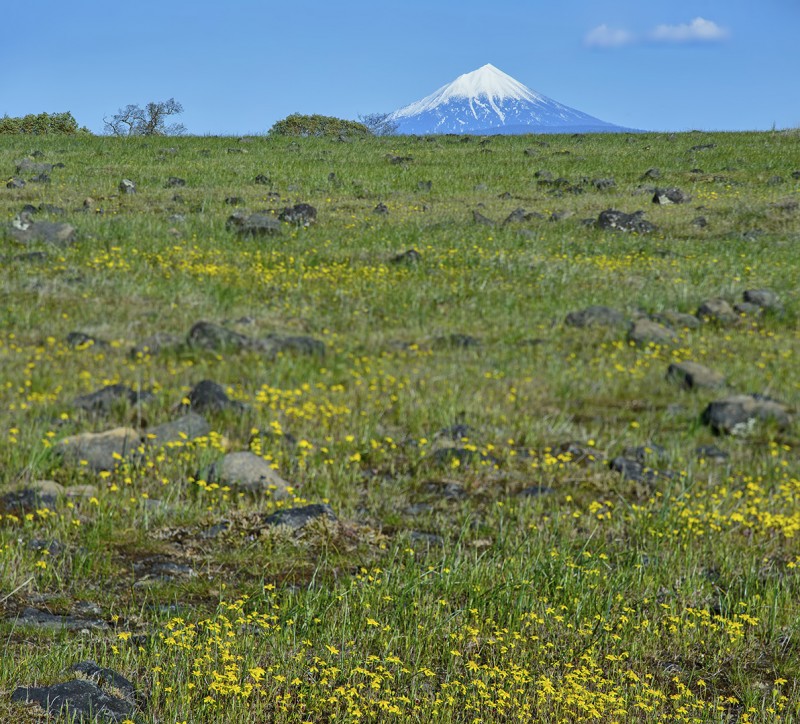
It’s not perfect, but now I have a new option at my fingertips in the future. Two things I need to do differently:
1) Take more than two photos. Notice how the finished result is out of focus in the middle. Had I taken three or four photos, each with a different focus point, the entire stacked photo could have been in focus.
2) Maintain the same, or nearly the same, composition (and camera settings–shutter speed, ISO, aperture). I recomposed the scene a bit after taking the first image which doesn’t make for the best stacking conditions later in post.
A more recent focus stack of a similar scene can now be found here.
Yesterday was the first warm day we have had in months, and it almost felt like the day when I took this photo (my random, desktop photo of the day) back in the summer of 2011. I went on a bike ride and saw just a touch of snow on Mt. Ashland, extremely rare for this time of year. I’m guessing there isn’t much on Mount McLoughlin either given the nearly snowless winter we are experiencing.

Lake of the Woods and Mt. McLoughlin
I went on my third snowshoeing adventure yesterday. I parked at Buck Prairie, snowshoed Peabody’s Wayback, and the location above is at or near Peabody’s Lookout. I never saw a sign that said Peabody’s Lookout so I may not have actually made it there. The trail ran out at this point so I headed straight down the mountain and ended up between the restroom and Natasha’s View on the map so I figure I was close to Peabody’s Lookout.
In the distance in today’s panorama photo you can see a portion of snowed over Howard Prairie Lake and beyond that Mt. McLoughlin on the left and Brown Mountain on the right. Next time I’ll have to bring my 70-300mm lens instead of my 14-24mm lens for a much more close up view of these beauties.
Today’s photo is from last week’s trip to the Howard Prairie Lake Resort Marina. Today we are heading down to California to do a weekend of camping at Lake Siskiyou.
Mount McLoughlin can be seen in the distance in the center. In real life the mountain stands out much more, but with a wide angle lens everything seems more distant than in reality.
Twenty miles east of Ashland you will find Howard Prairie Lake. We headed up there yesterday to escape the heat and take a bike ride. At an elevation of over 4500 feet (Ashland is at 2000 feet), the temperature is usually about 10 degrees cooler.
Today’s photo is a three pic photomerge (with a wide angle lens to begin with) so it covers almost 180 degrees. If you look really closely you can see Mt. McLoughlin to the right of center.
The guidebooks for hiking or biking Eastview Trail talk about the wonderful views from the trail itself. Actually, there aren’t any views of the east anymore from Eastview Trail as the trees have grown since the trail was created and now the views are all obstructed. It’s still a nice trail though.
Near the trailhead, you do get a bit of a view from the location pictured here. That’s Mount McLoughlin poking up in the distance on the right.